How an Online CCTV Designer Makes System Planning Practical and Efficient
@onlinecctvdesignerstore
November 4, 2026 · 9 min read
When I first started working with security systems, the planning phase was always the part that took the longest. You would drive out to a site, walk the perimeter with a notepad, sketch camera placements by hand, then go back to the office to figure out cable runs and power requirements. If the client wanted changes, you started over. That workflow has not disappeared entirely, but it has changed a lot in the last few years. A good online CCTV designer now lets you do most of that work from a browser, and the difference in time and accuracy is significant.
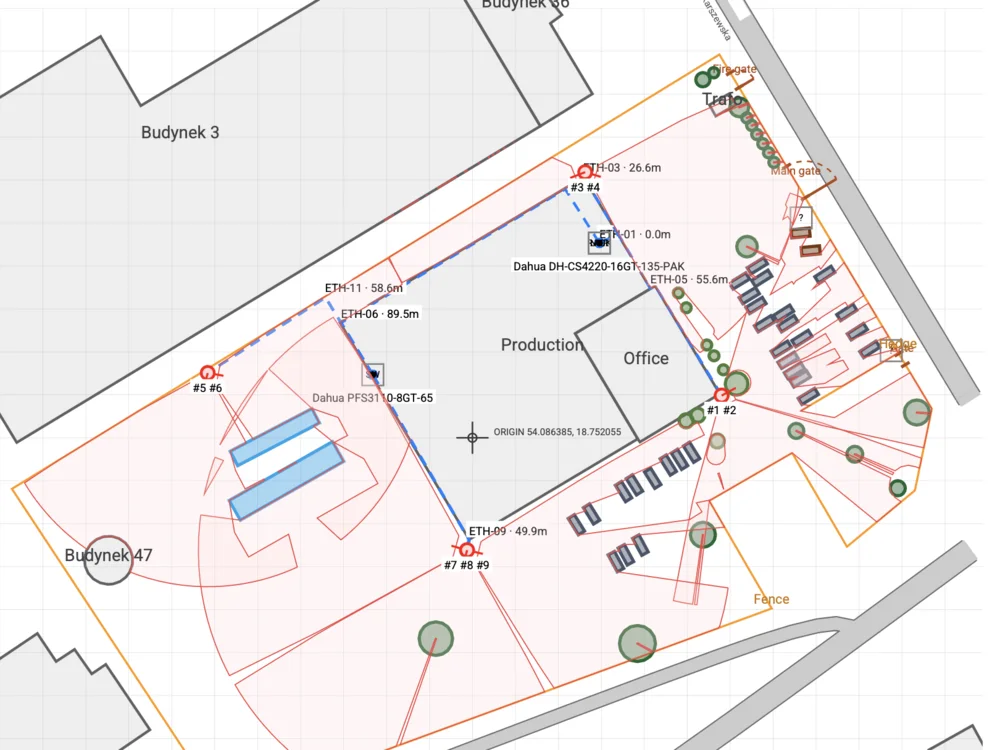
The core idea is simple: you load a floor plan or a satellite image of a property into a web-based tool, then drag and drop cameras onto the map. The tool calculates fields of view, shows you blind spots, and helps you choose the right lens for each location. It also keeps track of the hardware you select, so you end up with a bill of materials and a system diagram that you can hand to an installer or share with a client. I have used several of these tools over the years, and the ones that work best treat the design process as a series of trade-offs, not a checklist.
Why the Old Way Falls Short
Sketching a system on paper has a fundamental problem: you cannot see what the camera sees. You might mark a spot on a blueprint and think it covers the entrance, but once you account for the lens, the mounting height, and the angle, that coverage shifts. I have watched installers mount a PTZ camera only to find that a structural pillar blocks half the pan range. Those mistakes cost time and money to fix. An online CCTV designer helps you catch those issues before anyone climbs a ladder.
Another limitation of manual planning is that it does not scale well. If you are designing a system for a small retail store, a sketch might be enough. But when you start working on a warehouse with multiple aisles, a parking garage, or a school campus, the number of cameras grows fast. Keeping track of which DVR or NVR each camera connects to, how many PoE switch ports you need, and whether the cable runs exceed the 100-meter limit for Ethernet cable becomes a headache. A digital tool keeps all that data in one place and flags conflicts automatically.
What a Good Online CCTV Designer Actually Does
I have tested a handful of these tools, and the ones I keep coming back to share a few common features. First, they let you import a real site layout. You can upload a PDF floor plan, a CAD file, or even a screenshot from Google Maps. That gives you a precise canvas to work on. Then you place cameras on that canvas. As you move a camera icon, the tool shows a cone or wedge representing its field of view. You can adjust the lens, the resolution, and the mounting height, and the cone changes in real time. That is where the real insight lives.
For example, a 2.8mm lens on a 4MP IP camera gives a wide field of view but less detail at a distance. If you need to read a license plate at the far end of a parking lot, you might choose a 12mm lens instead, which narrows the field but sharpens the detail. The tool shows you exactly what each lens choice means for coverage. You can also toggle between day and night views, accounting for infrared illumination and its effective range. That kind of feedback is impossible to get from a paper sketch.

Beyond placement, the tool should handle the system design side. It should let you assign each camera to a specific NVR or DVR channel, select the recording resolution and fps, and decide whether to use continuous recording or motion detection. Some tools even help you estimate storage requirements, which is a question every client asks. How many days of footage will this hard drive hold? If you record 24/7 at 15 fps versus recording only on motion events, the difference in storage is huge. A good online CCTV designer gives you those numbers without requiring a spreadsheet.
Hardware Choices and Compatibility
One area where these tools earn their keep is hardware compatibility. Not every camera works with every recorder. An analog camera, for instance, needs a DVR with coaxial cable connections, while an IP camera needs an NVR and Ethernet cable. Mixing them in the same system requires extra planning. A design tool that knows the specifications of common brands can warn you if you are trying to pair a camera with an incompatible recorder. It can also calculate how many PoE switch ports you need and whether your power budget is sufficient.
I remember a job where we had to run coaxial cable for eight analog cameras and Ethernet cable for four IP cameras. The site was a three-story office building with concrete walls. We had to plan the cable paths carefully because drilling through concrete is expensive. An online CCTV designer helped us map the cable routes, estimate the lengths, and order the right spools of cable. Without that, we would have either over-ordered by a lot or run short on site.
From Design to Client Offer
One of the most practical features of a modern online CCTV designer is that it can generate client-facing documents. After you finish the layout, the tool can produce a proposal that lists every component, the total cost, and a diagram of the system. That saves hours of time in the sales process. Instead of taking notes from a site survey and then building a quote in a separate program, you do it all in one place.
The client can see the camera placements on their own floor plan and understand why you chose each location. That transparency builds trust. I have found that when clients can visualize the coverage, they are less likely to ask for changes later. They see the blind spots and accept the trade-offs before the installation starts.
Remote Monitoring and Cloud Storage Considerations
Modern systems almost always include remote monitoring. The client wants to check the feed from their phone or laptop. That means the design needs to account for network bandwidth, remote access setup, and whether to use local storage or cloud storage. Cloud storage adds recurring cost but provides offsite backup. Local storage on an NVR is cheaper in the long run but vulnerable if someone steals the recorder. An online CCTV designer that lets you weigh these options and see the cost difference helps the client make an informed decision.
Video analytics is another layer that changes the design. If the client wants motion detection that ignores shadows and pets, or wants to trigger an alert when a person crosses a virtual line, those features require cameras with built-in analytics or a recorder that can process the video stream. Not all cameras support the same analytics. A design tool that tracks those specs prevents you from specifying a camera that cannot do what the client expects.
Practical Tips for Using an Online CCTV Designer
Based on my experience, here are a few things that make the process smoother:
- Start with a clean site survey. Take measurements of walls, note ceiling heights, and mark obstacles like pillars or large equipment. The more accurate the input, the better the design.
- Do not rely solely on the tool for camera placement. Walk the site afterward, even if it is just mentally, and check for obstructions the satellite image might miss, like a new partition wall or a temporary storage rack.
- Always overestimate cable lengths by at least 10 percent. The tool can estimate, but real-world routing often requires extra slack.
- Use the tool to generate multiple design options. Show the client a cost-optimized version and a coverage-optimized version. They will appreciate the choice.
- Export the technical specifications for the installer. A good tool will produce a list of camera models, lens sizes, and connection details that the installer can follow on site.
These practices save time and reduce the number of change orders during installation. I have used an online CCTV designer on projects ranging from a small dental office to a large distribution center, and in every case, the upfront planning paid off.
The Trade-Offs You Need to Know
No tool is perfect, and an online CCTV designer has limitations. You still need to understand the basics of security system design to use it well. The tool can show you a field of view, but it cannot tell you that the camera will be pointed directly at a window, causing glare. It can estimate storage, but it cannot know that the client will want to keep footage for 90 days instead of 30 after a break-in incident. Those decisions require human judgment.
Another trade-off is that some online tools lock you into a specific brand or ecosystem. If the tool only supports one manufacturer's cameras, you lose the flexibility to choose the best hardware for the job. The better tools are brand-agnostic or support a wide range of models. They let you mix different makes of IP cameras, analog cameras, and recorders as long as the specs are compatible.
Finally, remember that the tool is a planning aid, not a replacement for a site visit. I have seen designs that looked perfect on screen but failed in the field because the installer did not account for a low ceiling that blocked the camera's tilt range. Always verify the design against the real environment.
Why This Matters for Your Business
If you design security systems for a living, an online CCTV designer is not a luxury. It is a practical tool that reduces errors, speeds up the quoting process, and helps you communicate with clients and installers. The time you save on planning can go toward selling more projects or refining the details of a complex installation. And the accuracy you gain means fewer callbacks and happier customers.
I have seen teams go from taking three days to design a 20-camera system to finishing it in a few hours with the right tool. The difference is not just speed; it is confidence. When you can see the coverage before anyone picks up a drill, you sleep better at night.
Whether you are working with IP cameras and NVRs or analog cameras and DVRs, the principles of good design remain the same. Know the site, choose the right lens, plan the cable paths, and verify the coverage. An online CCTV designer just makes all of that easier to do in one place. If you have not tried one yet, I recommend giving it a shot on your next project. You might be surprised how much smoother the process becomes.